
PR Tours
A guided walkthrough of any GitHub PR. Pick a PR, get the diff broken down by what each piece is actually doing, with pointers to the lines that prove it.
A 47-file PR isn’t 47 unrelated edits. Tern groups it by what’s changing together: the auth refactor, the new error path, the test fixture update. Each group gets a paragraph of context and pointers at the load-bearing hunks. Mechanical edits (renames, formatting, import shuffles) get demoted so attention lands where it matters.
Three places to read a tour: in the browser, in VSCode, or as a posted review on GitHub. The CLI command tern pr-review is the entry point for all three. It works on open PRs and on unmerged branches that don’t have a PR yet.
Read it in your browser
The default path:
tern pr-reviewTern picks the right thing based on the state of your branch:
- Branch has an open PR, your HEAD matches the PR head. Opens the PR tour.
- Branch has an open PR, your HEAD has diverged. Prints a warning, tours your local branch instead. Push to bring the PR in sync, or pass the PR URL to tour the PR’s head.
- Branch has no open PR. Tours your local branch directly, comparing HEAD against the merge-base with the repo’s default branch.
The auto-detect uses the gh CLI, so install and authenticate it first. Or pass a URL from anywhere:
tern pr-review https://github.com/owner/repo/pull/123Tern opens the review page on app.tern.sh. Tour stops are listed on the left rail; the diff scrolls past on the right, with each hunk grouped under the stop that explains it.
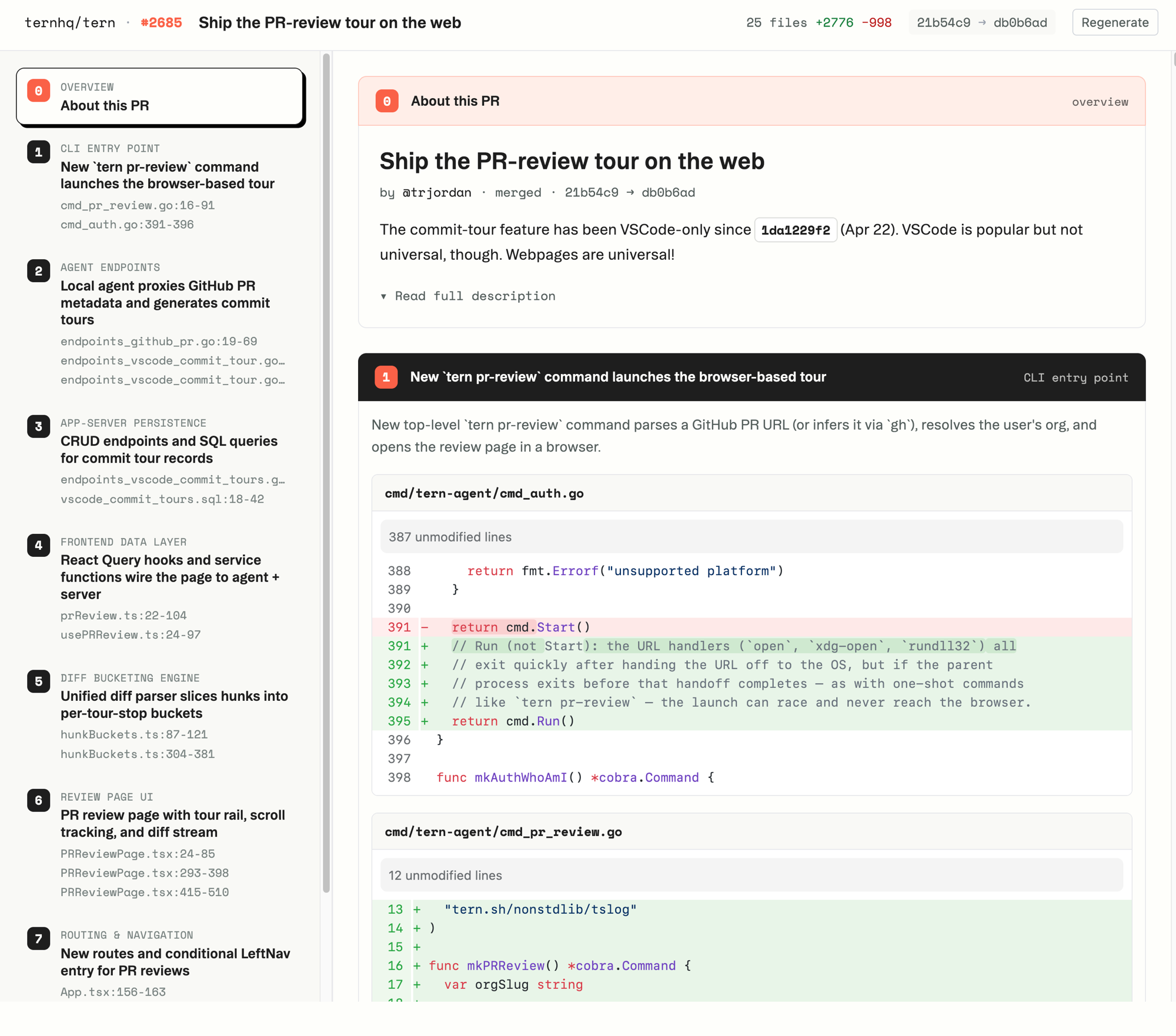
If you don’t already have a local agent running, tern pr-review brings one up and keeps it alive while you read. Close the terminal when you’re done.
Force the branch tour
To tour the local branch even when the branch has an open PR (e.g. you want to review your own pre-push changes):
tern pr-review --curr-branchPass --repo-dir to point at a different worktree. The directory needs to be linked first; if you haven’t, run tern repo add . from inside it.
Read it in VSCode
Install the Tern extension from the Marketplace and open the Tern sidebar. Click Tour PR/Commit, paste a PR URL, and the walkthrough renders next to the diff.
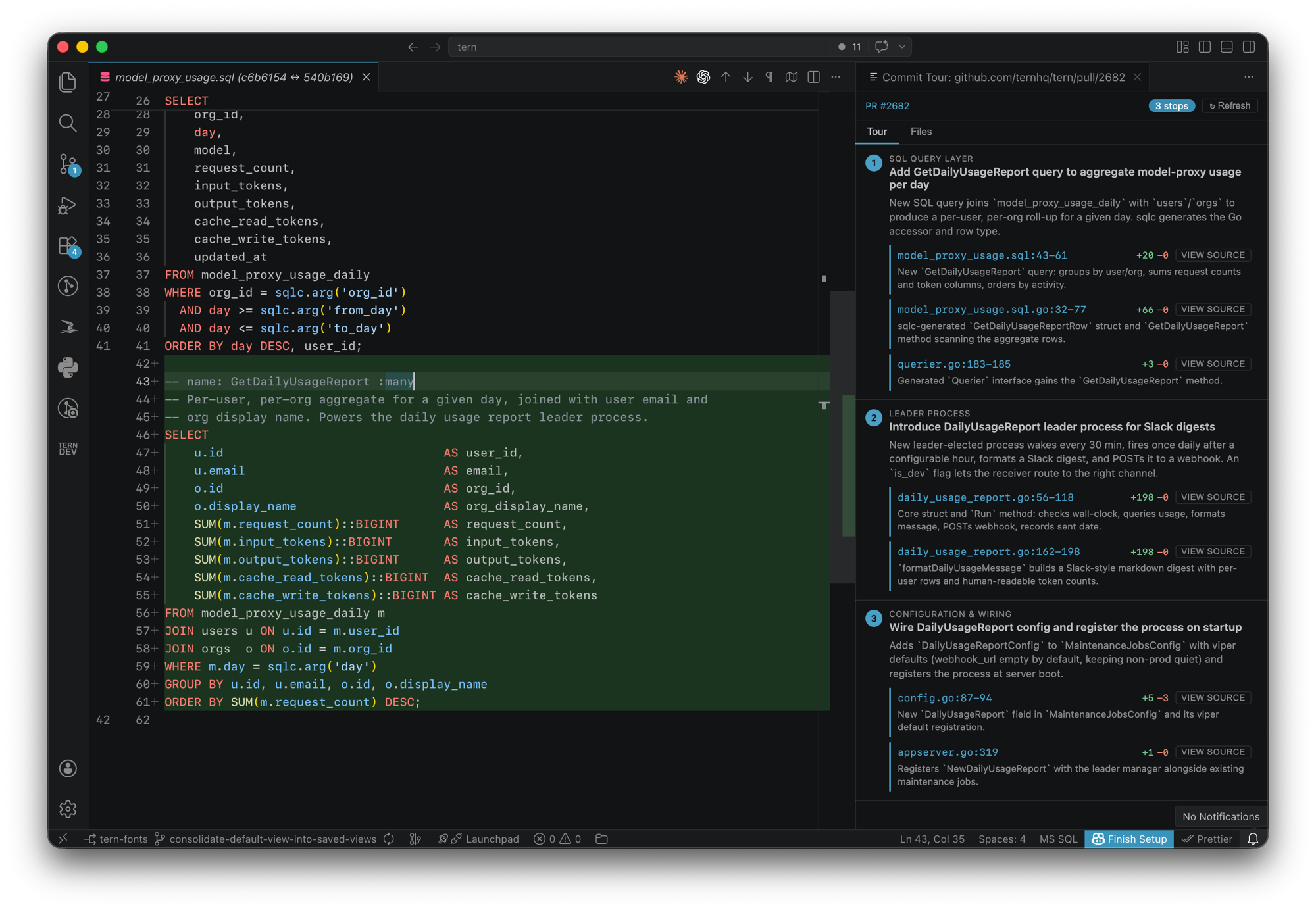
If your workspace is checked out at the PR’s head SHA, gutter marks line up with your live code, and clicking a pointer in the tour jumps straight to the file. Hit Refresh after new pushes. Works on individual commits too, not just PRs.
Post a tour as a GitHub review
For sharing the walkthrough with your team:
tern pr-review --post-draftTern generates the tour and posts it as a pending GitHub review with one inline comment per stop. The review body has a table of contents that anchors to each inline comment, so reviewers can navigate with a click.
By default, the review is pending: only you can see it until you submit. Open the review URL Tern prints, edit anything you want, then submit through the GitHub UI.
A heads-up about pending reviews: GitHub’s “Finish your review” modal silently overwrites the review body when you submit a pending review. If you go that route, copy the table of contents out of the draft body and paste it back into the modal before submitting. Or skip the modal entirely:
tern pr-review --post-draft --submit--submit posts and immediately publishes the review as a Comment review, preserving the body. The tradeoff is that it’s visible to everyone the moment it lands; you can’t tweak inline comments before others see them.
Anatomy of a tour
Same on every surface.
Stops. A handful of conceptual chunks, each with a one-paragraph explanation. Numbered, ordered, summarized at the top of the tour.
Pointers. Each stop names the specific files and line ranges that carry its idea. Click one to jump to the file (or, on GitHub, to the inline comment).
Table of contents. Linked to inline comments on the GitHub review and to stops in the web/VSCode views.
Notes
--post-draftand the auto-detect-PR shortcut both shell out to theghCLI; make sure it’s installed and authenticated.- For
--post-draftand--curr-branch, the repo must already be linked withtern repo add .. If multiple of your Tern orgs have it linked, Tern picks the most recently active. - Tour generation is cached per (PR, head SHA). Re-running on the same SHA returns the existing tour. Push new commits, run again, get a fresh tour.
Reference
tern pr-review --helpSee also:
- Quickstart — install the CLI and connect to your repo.
- Architecture — how the local agent and app.tern.sh fit together.
- Skills — using Tern from inside Claude Code.