Tours
Your agent just finished a run. The diff is 47 files. The prompt fit in a sentence; the plan you wrote fit on a page. Somewhere between that and now, things drifted: some of what you asked for didn’t ship, some of what shipped you didn’t ask for, and the rest is in there somewhere.
A 47-file PR isn’t 47 unrelated edits. Tours groups it by what’s changing together (the auth refactor, the new error path, the test fixture update) and attaches each group to the prompt or plan that asked for it. Mechanical edits (renames, formatting, import shuffles) get demoted so attention lands where it matters. Code with no matching prompt is left visibly unattached, so the drift is in front of you instead of buried in the diff.
It’s not review-at-PR-time. It’s read-immediately-after-run, while the gap between what you wanted and what shipped is still legible. Tours fires the moment the agent stops, before there’s even necessarily a PR. Install Tern to try one in about a minute.

Install and your first tour
curl https://tern.sh/install | bash
tern tourThe installer runs tern tour for you as its last step, so the first tour opens before you’ve typed anything. After that, tern tour works anytime, from any repo, on any branch: it’s the command to remember, and the rest of this page is about what it gives you. First run also creates a Tern account and drops credentials in ~/.tern/auth/; see Install Tern for the auth details.
Mine your agent sessions
Initially, tours are inferred from the diff alone. But you’ve usually already said what you wanted, somewhere.
Tern can use your agent logs and plans to inform your tour. Claude Code, GitHub Copilot CLI, and opencode sessions are all read, automatically, from their standard locations on your machine. Tern extracts decisions (“directives”) out of your sessions, clusters them into the intents behind your work, and matches each diff to the intent. This is fed as context to the tour generation, allowing Tern to tag individual hunks with your decisions (or lack thereof).
Depending on how many conversations you have locally, this will take 5-15 minutes to initially set up. Subsequent runs will only load new sessions.
tern plandoc bootstrapYou can also trigger it from the Begin analysis banner on any tour.
Surfaces
In your browser (default)
tern tour with no arguments does the right thing for the branch you’re on:
- If the branch has an open PR and your local HEAD matches the PR’s head SHA, tour the PR.
- If the branch has an open PR but your HEAD has diverged, warn and tour the local branch against its merge-base.
- If the branch has no open PR, tour the local branch directly.
This shortcut shells out to the gh CLI to discover the open PR, so gh needs to be installed and authenticated.
Or point it at a specific PR (no gh required for this form):
tern tour https://github.com/owner/repo/pull/123To force a branch tour even when there’s an open PR you’d rather skip, use --curr-branch.
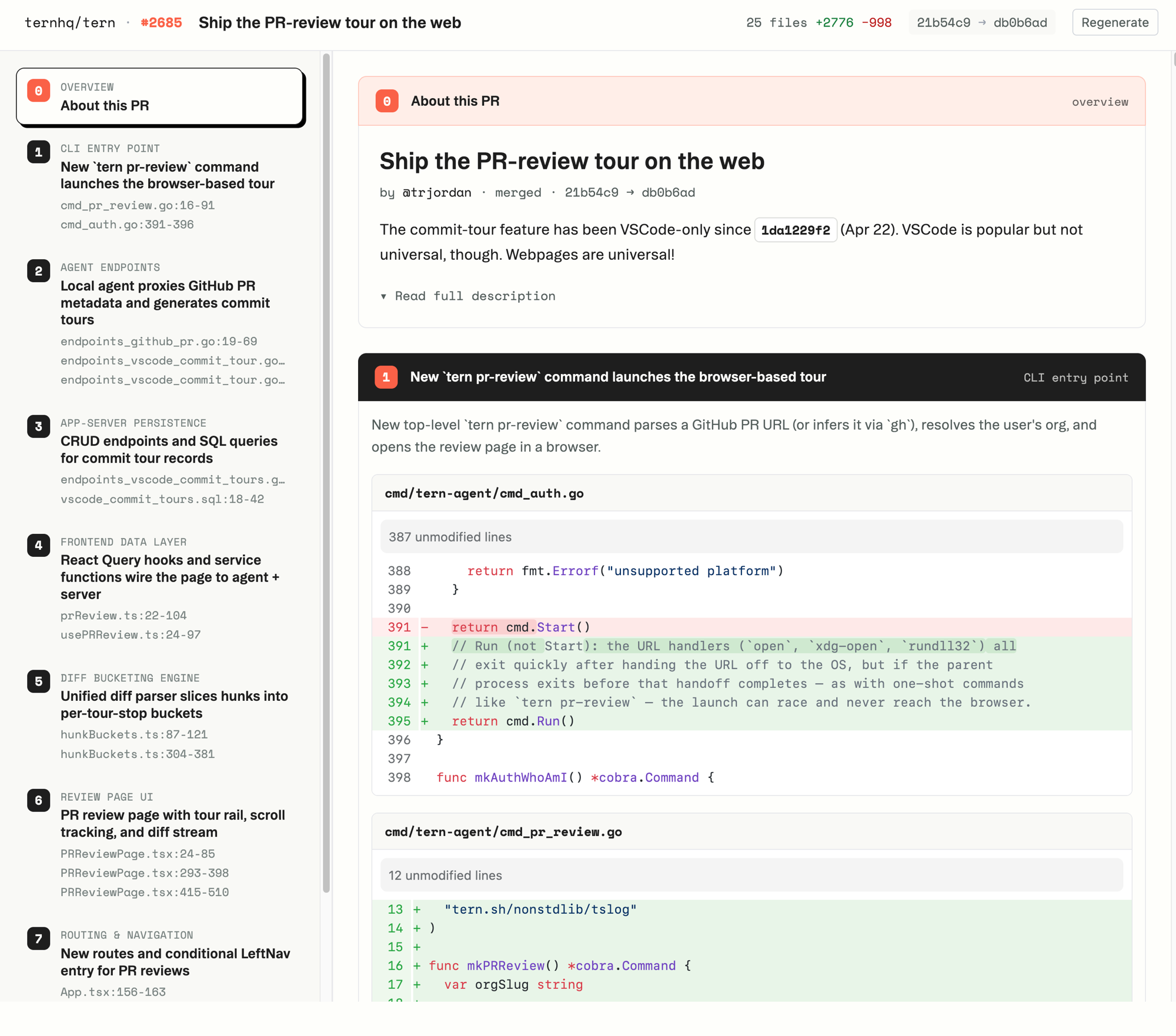
The browser view is one readable spine: every stop in narrative order with its rationale and its diff inline, and a rail beside it that’s the same story in miniature. Click a rail entry to jump; a read counter tracks what you’ve actually looked at, and next → takes you to the first thing you haven’t. Fold controls cycle how much code is open at once, from stop summaries only out to every diff. While the tour is still generating, the full changeset is there to read; pieces and stops take over as they’re carved out.
If you don’t already have a local agent running, tern tour brings one up (running the same flow as tern connect) and keeps it alive while you read. If an agent is already running on the configured port, the URL just opens and the command exits, leaving the existing session in charge.
In Claude Code
If you work in Claude Code, the Tern Tour plugin drives all of this from your agent:
/plugin marketplace add ternhq/tern-claude-plugin
/plugin install tern-tour@ternThen ask the agent to “review this branch with tern” or invoke the slash command:
/tourThe skill installs the tern CLI if it’s missing, creates an account on first run, and opens the tour in your browser. No browser available, like a remote or CI shell? It falls back to posting the tour as a pending GitHub review.
As a GitHub review
To post the tour for sharing with your team, run:
tern tour --post-draftTern generates the tour and posts it as a pending GitHub review with one inline comment per stop. The review body has a table of contents that links to each inline comment, so reviewers can navigate with a click. Open the review URL Tern prints, edit anything you want, then submit through the GitHub UI.
--post-draft needs gh on your PATH to post the review.
A heads-up about pending reviews: GitHub’s “Finish your review” modal silently overwrites the review body when you submit a pending review. If you go that route, copy the table of contents out of the draft body and paste it back into the modal before submitting. Or skip the modal entirely:
tern tour --post-draft --submit--submit posts and immediately publishes as a Comment review, preserving the body. The tradeoff is that it’s visible to everyone the moment it lands; you can’t tweak inline comments before others see them.
Anatomy of a tour
Pieces and stops. A tour breaks the change into a handful of pieces, the conceptual moves, and each piece into stops: the individual decisions, each with a category, a one-paragraph rationale, and the files and line ranges that carry it. Compound numbers (1.4) keep the spine readable; a small change skips the piece layer and the stops stand on their own.
Author’s prompts. When Tern has mined your agent sessions, each stop lists the prompts behind it; expand them to see what you actually said. The inverse is the signal: no prompt found on a stop means the agent did something nobody asked for. Read those first.
Not interesting. Renames, import shuffles, formatting, and anything else mechanical sinks below the numbered story: still there, folded, out of the way.
Table of contents. On GitHub reviews, the review body lists every stop with an anchor link to its inline comment. In the browser, the same role is played by the rail.
Common questions
I have multiple sessions open. Which one does Tern use?
All of them. Tern reads every Claude Code session under ~/.claude/projects/, plus your GitHub Copilot CLI and opencode session state, and clusters them into intents. For each tour, it matches the PR’s title and description against that inventory and picks the intent that fits. There’s no “active session” concept. If a tour pulls in prompts that aren’t relevant to this branch, it’s usually because your intent inventory needs a refresh. Re-run tern plandoc bootstrap or click Begin analysis in the tour banner.
Can I tour something other than a PR?
The CLI takes a GitHub PR URL or nothing:
tern tour # current branch's PR, or the branch if no PR
tern tour https://github.com/owner/repo/pull/123 # a specific PR
tern tour --curr-branch # current branch, ignoring any open PRPass --repo-dir /path/to/clone to --curr-branch if you’re running from outside the worktree. Specific-commit tours aren’t exposed at the CLI today.
What if I don’t use Claude Code?
Tern also reads GitHub Copilot CLI and opencode sessions, the same way and automatically. Without session logs from any of those, tours still work: Tern generates the tour from the diff alone, grouping hunks into pieces and stops and writing rationale by reading the patch. What you lose is the attribution: no “author’s prompts” on the stops, and no “no prompt found” flag, because there’s nothing to trace against.
Markdown plan files work regardless of agent: drop a plan into your repo and Tern will pick it up alongside session logs. Other agents and other plan formats aren’t supported yet. If there’s a workflow you’d like Tern to read from to inform tours, tell us. We want to know.
Where does my code go? Does Tern see it?
Most processing happens locally: the agent runs on your machine, reads your repo there, and keeps the tour content (pieces, stops, rationale) in its local SQLite under ~/.tern/. The browser view reaches back to your local agent for that content rather than storing it on Tern’s servers.
What lands on Tern’s servers: your account, your org membership, and the tour-set identity (PR / branch pointers, tour history). Identifiers and short text summaries, not your code.
What goes to the LLM: file paths, the diff text it needs to reason about the change, and prompts from your agent sessions. By default that goes through Tern’s Anthropic proxy; point it at your own provider instead if you’d rather (see AI Models). Architecture has the longer version.
How fresh is the tour?
Tours are cached per (PR or branch, head SHA). Re-running on the same SHA returns the existing tour. Push new commits, run again, get a fresh tour.
Can I regenerate a tour without pushing?
Click Regenerate in the browser view. The old tour stays in the set’s history and the new one is appended, so the tour URL is stable: bookmarks survive.
How do I share a tour with a teammate?
Two ways. tern tour --post-draft posts the tour as a GitHub review; anyone with read access to the repo can read it there, no Tern account required. Or share the tour URL itself: teammates in your Tern org can open your tours in the browser, read-only. Org sharing is enabled per team today. Email us and we’ll turn it on for yours.
Reference
Usage
tern tour [github-pr-url]With no argument, tour the current branch: its open PR if HEAD matches the PR’s head SHA, else the local branch against its merge-base. With a PR URL, tour that PR. The current-branch shortcut requires the gh CLI authenticated against GitHub.
Flags
--curr-branch. Tour the current branch directly without a PR, even when an open PR exists. Doesn’t require gh.
--repo-dir <path>. Used with --curr-branch when you’re running from outside the worktree. Defaults to the current working directory.
--post-draft. Generate the tour and post it as a pending GitHub review instead of opening the browser. Requires gh authenticated against GitHub.
--submit. Only meaningful with --post-draft. Posts and immediately submits as a Comment review, skipping pending state and preserving the body (which GitHub’s UI submit otherwise clobbers).
Full help:
tern tour --help
tern plandoc --helpUsing a different LLM
By default, LLM calls go through Tern’s Anthropic proxy. To use your own key instead — Anthropic direct, OpenAI, Gemini, Bedrock, Vertex, Portkey, or any OpenAI-compatible router — configure the provider and disable the proxy with TERN_MODEL_BASE_URL=null. See AI Models for the full list, env vars, and precedence rules.
Notes
- Tours are cached per (PR or branch, head SHA). Push new commits, run again, get a fresh tour. Click Regenerate in the browser to refresh without pushing.
--post-draftand the no-arg current-branch shortcut both shell out togh. Passing an explicit PR URL skips thegh-based detection but not the post-draft requirement.
See also
- Install Tern: install the CLI and run your first tour.
- Architecture: how the local agent and the hosted web app fit together.
- AI Models: configuring which provider runs the LLM calls.
- Troubleshooting: if something’s broken or weird.